


Webull: Investing & Trading
4.641.27K Reviews
App Specs
- Version
- 11.7.0.37
- Updated On
- License
- Free
- Downloads
- 10,000,000+
- Developer
- Webull Technologies Pte. Ltd.
- Categories
- Finance
- Platform
- Android, iOS
Screenshots
 Analysis by AppCompare
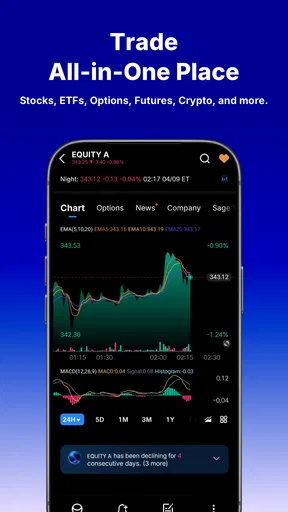
When I choose an investing app, I first ask what I want to do with it: place occasional trades, follow markets closely, or keep a broad range of investments and research in one place. Webull: Investing & Trading is aimed at people who want more than a simple buy-and-sell screen. It brings stocks, options, crypto, futures, and ETFs into a finance app, so it can suit someone who likes to monitor different markets from the same place. That breadth is useful, but it can also make the experience feel busier than a basic investing app.
I’d think about how much control and detail I actually want before moving an account or building a routine around it. If I mainly want a quiet way to make occasional long-term investments, a simpler service may feel less distracting. If I enjoy exploring charts, tracking price changes, and learning how different products behave, Webull has more to engage with. The key question isn’t whether it has many tools; it’s whether I’ll use them thoughtfully rather than mistake a crowded screen for a better investment plan.
Choosing the right kind of investing app
There are a few broad alternatives in this category. A beginner-focused investing app may put simplicity and guided choices first, while a traditional brokerage may appeal to people who prefer a more formal, account-centered experience. A specialist charting tool can be a better fit for someone who already has a broker and only needs market analysis. Webull sits closer to the all-in-one trading option: it combines market access with research-oriented screens and tools, rather than treating investing as a quick, hands-off task.
That distinction matters in everyday use. When I open an app just to check a long-term holding, I don’t necessarily want to be pulled into short-term price movement or a stream of market discussion. But when I’m comparing several securities or trying to understand why a chart has changed, having analysis and trading functions close together can save me from switching between apps. I’d choose based on the work I expect the app to do, not on the assumption that a longer feature list is automatically better.
Getting Started with Webull
First things first, setting up Webull: Investing & Trading is a breeze. It’s available on both Android and iOS, and downloading it is as simple as pie. Once you’ve got it installed, the sign-up process is pretty straightforward. You’ll need to go through the usual verification steps, but they make it as painless as possible.
Webull is a free finance app from Webull Technologies Pte. Ltd., with a Everyone age rating. It has a 4.6 average from around 209,000 ratings, and more than 10 million installs, which gives a useful sense of how widely it is used without telling me whether it is right for my habits. The current version is 11.7.0.37, and the app supports Android 8.1 and later. I’d still check that my device and operating system are compatible before planning a switch, especially if I rely on an older phone.
One of the cool things about Webull is that it’s not just a platform for buying and selling stocks. It actually aims to be a comprehensive tool for investors of all levels. Whether you’re a newbie or a seasoned trader, there's something for you here.
Worth Reading Before You Choose

EA SPORTS FC Mobile 26 Is a Bigger Football Game, but It Takes Time

Flipboard Shows What News Apps Must Do Beyond the Feed

Switching to Android Auto Means Rethinking Your Driving Routine

Google Calendar Makes a Crowded Week Easier to Manage

Ludo King Makes the Most of the Minutes Between Plans

Baby Panda World Brings Quick Play to Modern Phones, but Its Game Library Feels Busy
For a first-time user, I’d take a little time to arrange the app before placing any order. Decide which watchlists or market views you want to see, and hide or ignore the parts that don’t help with your goal. This small bit of setup can prevent an early session from turning into aimless browsing. I’d also separate learning from investing: practice with the educational and simulated tools first, then make real decisions only when I understand the order details and the risks involved.
Features That Stand Out
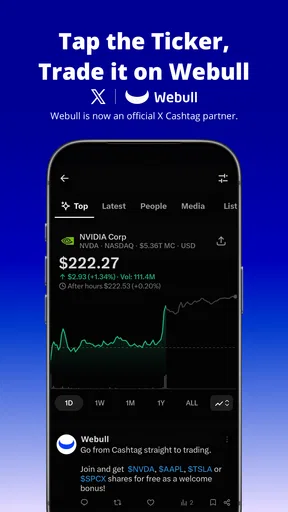
Webull is packed with features that make it stand out from the crowd. For starters, the app offers real-time market data, which is crucial for making informed trading decisions. The charts and analytics are top-notch, providing various technical indicators and drawing tools that are essential for technical analysis.
Those charts are most useful when I begin with a specific question: is a price moving within a range, how has it behaved over a chosen period, or does a pattern deserve a closer look? Indicators can help organize that investigation, but they don’t predict what happens next. I’d avoid piling on tools just because they are available. A clean chart with a small number of meaningful signals is easier to interpret than a screen covered in lines that all seem to suggest something different.
Another feature I found super handy is the paper trading. If you’re not ready to dive into the real market with your hard-earned cash, you can practice with fake money. It’s an excellent way to get your feet wet without any financial risk.
The best use of paper trading, in my view, is rehearsing a process rather than trying to prove that a strategy works. I can practice finding an instrument, reviewing an order, and seeing how a hypothetical position changes, while noticing whether I’m tempted to react to every move. Simulated results are not a promise of real-world outcomes, and the emotional pressure is different when actual money is involved. Treating practice as a way to learn the interface and test discipline makes it more valuable than chasing a winning streak on a pretend balance.
And let’s not forget the community aspect of Webull. The app allows users to interact with one another, share insights, and discuss trading strategies. It’s like having a mini stock market community right in your pocket.
I’d use those conversations as prompts for further research, not as instructions to trade. A confident post can leave out the author’s time horizon, risk tolerance, or reasons for changing their mind. One practical habit is to write down the claim that caught my attention, then check the underlying company or market information separately before acting. The community can make market ideas easier to discover, but it also makes it important to distinguish discussion from dependable analysis.
The User Experience
From a usability standpoint, Webull is pretty intuitive. The interface is clean and modern, which makes navigating through different sections a breeze. Whether you’re checking your portfolio, setting price alerts, or browsing through financial news, everything is laid out in a way that makes sense.
For a realistic daily routine, I might check a watchlist during a morning break, look at an alert later rather than repeatedly refreshing prices, and review my portfolio when I have enough time to think through a decision. Alerts are most helpful when I set them around a level or event I genuinely care about; too many can turn a phone into a steady stream of interruptions. I’d avoid treating a notification as a command to buy or sell. It is a cue to review the situation, with the final decision still mine.
I particularly like the customization options. You can tailor the dashboard to display the information that’s most important to you. It’s a small detail, but it makes a big difference in how you interact with the app daily.
Customization also has a trade-off: a dashboard can become a collection of interesting numbers that competes for attention. I’d keep the main view focused on the holdings and market information I routinely use, and leave less familiar areas for deliberate exploration. That approach makes the app easier to return to after a few days away. It also helps a long-term investor avoid confusing constant monitoring with useful oversight.
Costs, switching, and practical limits
The app itself is free to download, but in-app purchases are listed from $0.99 to $394.99 per item. I wouldn’t assume that every tool or purchase is necessary to use the core app; before paying for anything, I’d check what it unlocks and whether it solves a real need for me. More importantly, “free” does not mean investing is costless or risk-free. The value of any trade depends on the instrument, the terms, and the market, so I’d review the order carefully and understand possible charges or risks before confirming it.
Moving from another investing app takes more than installing a replacement. I’d first make a note of the watchlists, recurring routines, and research habits I rely on, then recreate only what I still need. I’d also consider whether I want to transfer an existing account or simply use Webull for research at first; those are different decisions, and I wouldn’t move holdings impulsively just because the new interface looks appealing. Keeping the old setup available until I’m comfortable with the new one can reduce the chance of losing track of a routine or acting under pressure.
Webull may not be the best match if I want a very simple, low-stimulation experience or prefer someone else to guide my investment choices. Its range can invite frequent checking and active trading, which is not automatically helpful for a patient, long-term plan. A simpler investing service may be easier for someone who wants fewer decisions, while a dedicated charting product may suit a person who already trades elsewhere and wants analysis without another trading environment. I see Webull’s main trade-off as flexibility paired with the need to set my own boundaries.
Security and Support
Security is a big concern when it comes to trading apps, and Webull seems to have this covered. They use encryption and other security measures to ensure your data and funds are safe. Plus, they’re a member of the SIPC, which means your investments are protected up to $500,000.
I’d still treat account security as something I actively manage, rather than something an app can take off my hands. I use a strong, unique password, keep access to my device protected, and pause before approving anything I don’t recognize. Investment protection and digital account security address different risks, so neither should be mistaken for a guarantee against losses from market movements or poor decisions. That distinction is worth keeping in mind whenever an app makes it easy to reach an order screen.
If you ever run into a snag, their customer support is responsive and helpful. They offer support via email and phone, and there’s a pretty comprehensive help center where you can find answers to frequently asked questions.
For routine questions, I’d start with the help center because it can be easier to search for a specific setting or process than to wait for a conversation. If the issue involves an account or a transaction, I’d use the available support channels and keep the details of the problem clear. I would not rely on a public community discussion for account-specific help. Separating general learning from private account support is a sensible habit in any finance app.
Final Thoughts
All in all, Webull: Investing & Trading is a robust platform that caters to both beginners and experienced traders. With its wide array of features, from real-time data to paper trading and community interaction, it offers a comprehensive toolkit for anyone looking to navigate the stock market.
While no app is perfect, Webull comes pretty close by combining functionality with ease of use. Whether you’re looking to make your first trade or refine your existing strategy, it’s definitely worth checking out. So go ahead, give it a whirl, and happy trading!
My recommendation is to try it first as a research and practice space, then decide whether its trading tools fit the way I actually invest. It is a strong candidate for curious users who want markets, charts, and different asset types gathered in one app, provided they are comfortable making their own decisions. I’d skip it in favor of a simpler alternative if its breadth encourages me to trade more than I intended. Used with a focused watchlist, a cautious approach to community ideas, and a clear reason for every order, Webull can be a useful everyday companion rather than a source of constant market noise.
Pros
- User-friendly interface for beginners.
- Commission-free trading on stocks.
- Real-time market data availability.
- Customizable alerts for market changes.
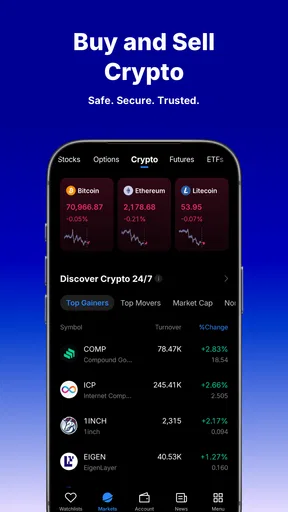
- Diverse investment options including crypto.
Cons
- Limited customer support options.
- Complex features may overwhelm novices.
- Occasional app lag during peak hours.
- No fractional share trading available.
- Advanced tools require learning curve.
FAQs for Webull: Investing & Trading
What features does the Webull app offer for investors?
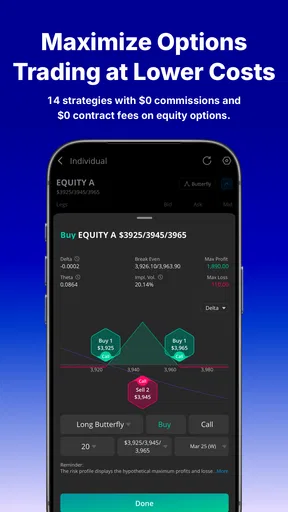
Webull provides a comprehensive suite of tools for both new and experienced investors, including real-time market data, customizable charts, and technical indicators. The app also offers commission-free trading on stocks, ETFs, and options. Additionally, users can access margin trading, IRAs, and a paper trading feature to practice strategies without risk.
Is Webull safe and secure to use for trading?
Yes, Webull prioritizes user security by implementing advanced encryption and secure protocols. It is a member of the SIPC, which protects securities customers of its members up to $500,000. Additionally, Webull is regulated by the U.S. Securities and Exchange Commission (SEC) and the Financial Industry Regulatory Authority (FINRA), ensuring compliance with industry standards.
What are the main benefits of using Webull compared to other trading apps?
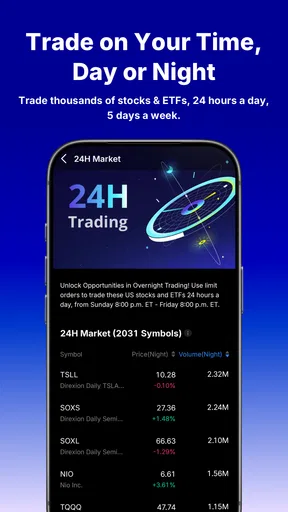
Webull stands out with its commission-free trading model, advanced analytical tools, and extensive market data. It's ideal for tech-savvy traders who appreciate detailed information and customizable features. The app also offers extended trading hours, allowing users to trade pre-market and after-hours, which can be advantageous for capitalizing on market movements.
Are there any fees associated with using Webull?
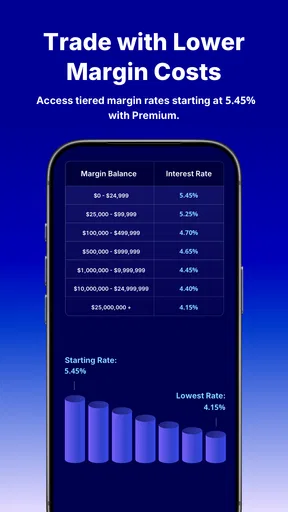
While Webull offers commission-free trading on stocks, ETFs, and options, certain activities may incur fees. For example, trading on margin involves interest charges, and there may be fees for wire transfers or specific regulatory fees. It's important to review Webull's fee schedule to understand any potential costs involved in your trading activities.
Does Webull offer any educational resources for beginners?
Yes, Webull provides a variety of educational resources, including tutorials, webinars, and articles that cover essential trading concepts and strategies. The app's paper trading feature is particularly beneficial for beginners, allowing them to simulate real market conditions without risking actual money. This learning-by-doing approach can be invaluable for gaining confidence and understanding the market.


